What is Robocopy ?
It is an advanced copy utility with has the feature to automatically resume file transfer on error or network disruption, or recover from terminated file copying, with selective copying based on new or updated criteria.Beside,It can preserve all of the file properties and information, including date and time stamps, security access control lists (ACLs) and more while replicating the file.
By default Robocopy came built-in with windows vista as a command line but as a command line interface only but microsoft has also released a GUI (graphical user interface) application comprising robocopy command completely.
See the snapshot below for more details.
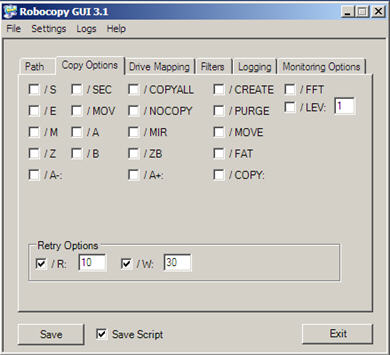
all of these features comes with with traditional Robocopy command line functionality, but for most of us , having these options integrated in a graphical interface really make it more useful.
Download Robocopy for Windows Vista
Technorati Tags: windows vista , vista faster copy operations , vista hacks
One reply on “How to make file copy faster with Robocopy in windows vista”
The GUI seems to add Robocopy XP026 to the system32 directory when used in XP.
The version of Robocopy that comes with Vista is XP027 (and XP028 in SP1 and 2008), if I remember correctly.
As they have slightly different switches and abilities, is it safe using the GUI on Vista?