Do you know the fastest way to open a file location of any desktop shortcut? i.e the directory where that file is located.
The most simple method to do this is to right click on the shortcut and then select properties and click the open file location button.
But if you have noticed in vista this feature now comes integrated with windows vista itself(as shown in the image below).
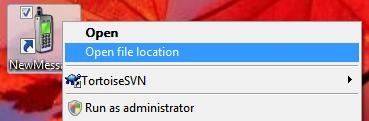
In windows XP also you can simply add “open file location” option in the right click menu as found in vista.
You need to download and install this software, download here in order to add open target location for any shortcut on desktop
One reply on “How to add open target location to right click of mouse in win xp”
That is a nice trick. Cool tool imo.