Yesterday, gmail my inbox was flooded with large number of mails, most of them were comments , TroubleFixers.com readers computer related problems etc.
But I was having a short time to read them they were more than hundreds in numbers, and even after using gmail handy keyboard shortcuts I was not productive enough.
After than I was trying to find out a different way to browse through large number of mails in gmail in some quicker way.

Then, I remembered the google experimental search which I had used some time back to navigate through results in google.
Here comes the key-point that is if you activate google experimental search into your google account , you can automatically use those keyborad shortcuts into gmail if you have gmail on that account.
Let’s see how can you use google experimental shortcuts in gmail
Follow the steps below
1. Log in to your Gmail account in FireFox or IE7 or any other browser which supports tab.
2. Press Ctrl+T to open new tab and go to the link below:
http://www.google.com/experimental/
3. Browse to the bottom of the page and click the button Join this experiment (as shown in the image below)
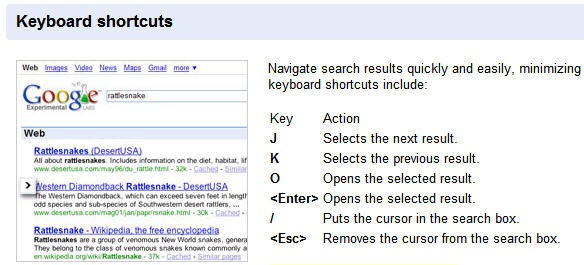
Following are the key board shortcuts, for google search and you can use the same keyboard shortcuts for gmail as explained below.
Key Action
J Selects the next mail.
K Selects the previous mail.
O Opens the selected mail.
<Enter> Opens the selected mail.
/ Puts the cursor in the search box.
<Esc> Removes the cursor from the search box.
We hope this small tweak will be useful to you.
Tip: If you like to know about some quick gmail keyboard shortcuts read this post on Make your self more productive using gmail with some useful shortcuts
One reply on “Get more keyboard savvy while using gmail with google experimental search”
Hey Abhishek bhai nice information , i tried them and yes they are useful . But is that necessary that we need tab enabled option , because i am using ie6 tried it on Firefox .