Most of us miss the most accessible Bookmarks Toolbar as there in firefox but not found in IE7.
But there is a bookmark toolbar in IE7 but it is not enabled by default so you need to enable it explicitly.
To Enable the Bookmarks Toolbar follow the steps given below.
1. Start >> Run and type iexplore and press Enter.
2. Press Alt key , go to view>>toolbars>>Select Links(as shown in the image below)
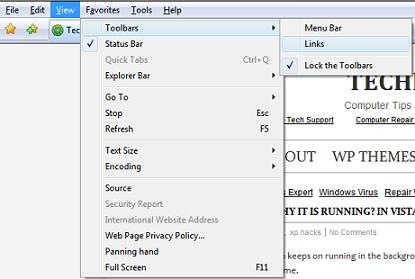
3. after selecting the Links, you will see a toolbar at the top below the File Menu.
To add a shortcut to the Links bar
- Drag the webpage’s icon from the Address bar of the browser
- Drag a link from a webpage directly to the Links bar
- Drag a folder path from a search window to the Links bar
To remove a shortcut from the Links bar
Right-click the shortcut in the Links bar, and then click Delete
To rearrange how your Favorites show on the Links bar
On the Links bar, drag a shortcut to a new location
So enjoy the links bar in Internet Explorer 7 similarly as the bookmarks toolbar in firefox.
One reply on “Get Bookmarks Toolbar Like Firefox by activating Links bar in ie7”
Hello my friend, your site is very good! http://apvmmvepbd.com