There are many users who prefer not to enter their username and password at windows login, for the following reasons:
- mainly because this would speed up the login process
- decrease the hassle for them of entering username and password
But enabling autologon in windows vista is again a security risk, but may not be a problem if you are not worried about your documents and files being visible to someone else, This small tweak is basically for home users.
But don’t worry about registry editing this time as there is a small freeware called AutoLoggon that does this job like a charm for you (as shown in the image below).
1. Downlaod AutoLoggon form here
2. Run it and enter the username and password of the user for which you want AutoLoggon(shown in snapshot below).
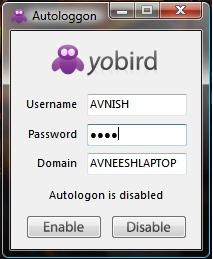
3. click Enable or Disable
This tweak applies to beginners, but more advanced tweaks to come so stay tuned.
2 replies on “Enable or disable autologon for any user in windows vista”
I have read about another method to enable auto logon, but not remembering how it was.
Nirmal, may it was LogonExpert AutoLogon tool? It may be interesting alternative solution to described above.