Toggle Hidden Files In Windows Via Context Menu Right Click

Advertisements

One of our reader asked us how can he quickly toggle to show hidden files and folders settings in windows, as we all know the process to show hidden files and folders in windows is quite tedious.

The normal process to toggle show hidden files and folders on and off is through windows explorer in which you need to first navigate to File Menu >> Tools >> Folder Options and then click the view tab and then uncheck or check the settings show hidden files and folders

What if you can quickly toggle hidden files and folders in windows via right click context menu, HiddenFilesToggle is a free shell extension for windows which works on windows xp, vista and windows 7 also which will add a new entry to the right click context menu which lets you toggle hide files in windows

This option in the right click context menu gives you the ability to toggle the display of hidden files on and off. This extension is very useful for those who frequently have to change this setting show hidden files and folders.
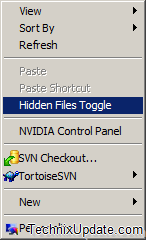
hidden-files-toggle

This small shell extension makes possible to turn off show hidden files and folders directly from your mouse right click.

This shell extension comes as a installer package, so you can opt not to start this shell extension with system startup and can uninstall it any time from the list of installed programs.

You can also read another trick which involves a executable togglehiddenfiles.exe which lets you turn on / off hidden files in window 

Download HiddenFilesToggle

You can follow us on Twitter or join our Facebook Fan Page for more updates like this and You can also ask a problems related to computers or technology on Ask Technix Update and get your solutions faster.

Other Related Interesting Articles

Author + Admin: Abhishek Bhatnagar
- Professional blogger by passion, Software Enggineer. I love to write about useful computer tips & tricks. Connect with me at twitter or on google+ profile or mail me at abhishek@technixmedia.com or know me more on www.abhishekbhatnagar.com

11 Comments

  1. [...] are many more extension which are on Ross’s File extension (Via Abhishek ) which you would find useful. Tagged with: file extension • hidden folders • shell [...]

  2. [...] and same options will be there in my computer context menu. We have written some related tips on Toggle Hidden Files Via Context Menu Right Click, Toggle Hide File Extensions Via Right Click Context Menu, Add Programs In Right Click Context Menu [...]

  3. Anon says:

    Thanks!

  4. [...] have written about some other tips which allows to toggle hidden files from right click context menu, Explorer hangs on right click on the drive, Toggle Hide File [...]

  5. busy says:

    thanks so much for this. i was using another one for windows 7 you had to shift click to get the menu, then you had to refresh the window for the files to show/be hidden. it was a mess. this solves everything, you rock!

  6. S.Singh says:

    Hey, tried this but it did not work on my Win 7 PC.

    It worked great on my Vistas and XPs.

    Great job but i hope you update it with a fix for win 7.

    thankz!!

  7. Samreet says:

    hey. do you think you could adapt this to work on windows 7 64bit version?

  8. rakesh says:

    how cn i download hidden toggle via right click

  9. talis says:

    This does not work with win 7 64.

  10. [...] Toggle Hidden Files In Windows Via Context Menu Right Click [...]

  11. Dave says:

    Great utility — but could you make it work for 64bit Windows too?
    Thanks!!

Leave a Reply