One of the most useful toolbar in firefox is google toolbar which helps you auto fill the information on various web pages and also prevent you from various pop ups. But the most annoying fact is that google toolbar is shown just below the firefox address bar so it takes a good amount of space and decreases the readable space in firefox.

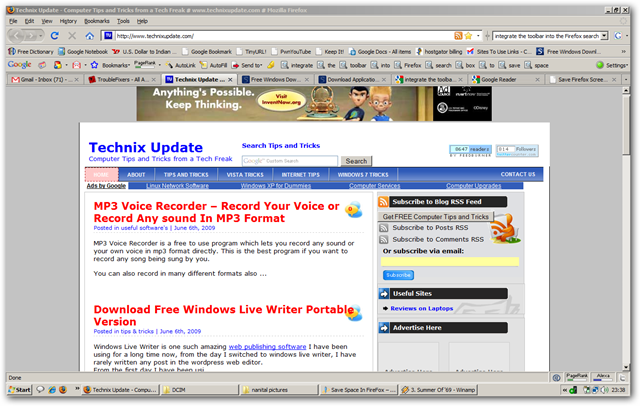
We can see both the snapshots given below one with google toolbar shown and other with google toolbar hidden and integrated with firefox search box
Google Toolbar Shown
Google Toolbar Hidden
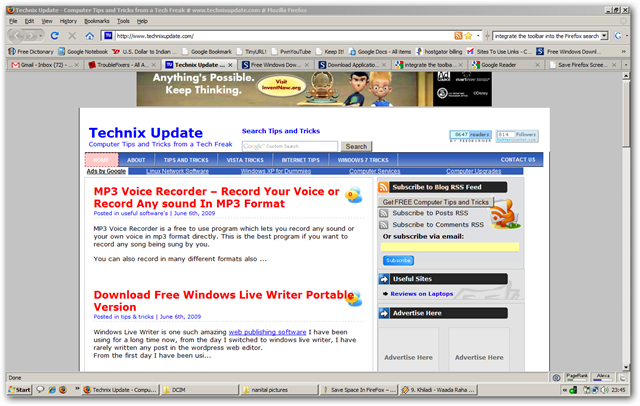
Let’s discuss how to hide google toolbar and integrate it to the firefox search box
Follow the procedure to hide google toolbar in firefox
1. On the extreme right of the google toolbar, you can see the text setting click on it.

2. Now, click the Layout text in the new windows just opened up, check the third option which says Replace Firefox Search Box and Hide Toolbar
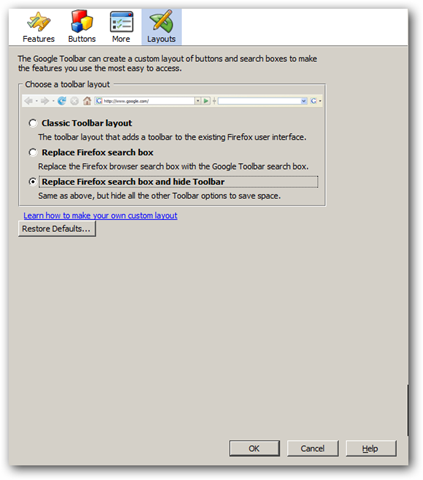
3. Click Ok
Tip: If you have stumbleupon toolbar installed you can hide it any time by pressing the keyboard shortcut Ctrl+11 – toggle to hide and show stumbleupon toolbar in firefox
Another good point behind hiding google toolbar and integrating with firefox search box is that it will start offering search suggestion just like google toolbar search box.
2 replies on “Save Space In FireFox – Integrate Google Toolbar In FireFox Search Box”
[…] Save Space In FireFox – Integrate Google Toolbar In FireFox Search Box […]
[…] Save Space In FireFox – Integrate Google Toolbar In FireFox Search Box […]