There are so many times we do not want Windows Xp to update automatically but the main problem is not even solved in system with Service Pack 2 integrated due to which even when after turning automatic updates…it continuously shows the annoying pop up message says “ Your automatic updates are of please turn them on.
This message is shown by a red shield symbol which is the default icon in the taskbar for security center of Windows Xp which has the responsibility of automatic updates , antivirus monitoring and firewall of the system.
So in order get rid of both of these annoying things you have to do following steps:
1. Press window+r to open run menu.
2.Type “msconfig†without double quotes.
3.Click the Services Tab in the open window.
4.Scroll Down to the bottom uncheck the two check boxes as highlighted in the image on below.
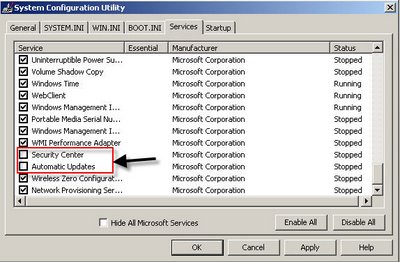
After unchecking these two check boxes click on apply then restart your system in order for changes to take place and after restart you will notice there will be no annoying message and that red shield get disappeared….and also most important even when automatic center is disabled the firewall of your system can still be on function like before.
5 replies on “How to remove the Automatic Update Warning Messages on Your Windows Xp or Vista System….with sp2.”
Hi! I want to ask if you will provide a link back to my site OR link exchange?
Contact me: alexvorn2@gmail.com or post a comment in my blog:
http://www.techgadgetblog.blogspot.com
The best!
Thank you!
Thank you very much ,saved me a lot of trouble.
You DO realise that, by opening Security Center (Control Panel), there’s a link to an option called “Change the way Windows notifies me” or something like that… and you just have to turn those off, without disabling any services…
Like salgado18 said, ALL YOU HAVE TO DO IS go to ‘Control Panel’ open up ‘Security Center’ on the left hand side, there links, , at the bottom of them is a link saying ‘Change the way Security Center alerts me’ Click this and UNCHECK the middle one. This will now make it so you aren’t alerted over any issue to do with automatic updates, including ANNOYING POP-UPS 😀