46

How to access blocked or restricted orkut or any site with proxy but without using any proxy servers for free.

A lot of people here in india and in other countries has become so addictive to orkut that they have become so curious to know every minute whether did they receive any new scrap.

So What is the Problem ?

The main problem that now a days orkut has been banned in many of the corporate offices and other institutions due to which people are not able to access orkut.

So people use various proxies like..

  1. http://www.jumboproxy.net
  2. http://www.kproxy.com/ Kproxy

But normally these “servers are overloaded with chunks of traffic please try after sometime“.

“So today i am going to tell how we can access orkut with proxy but without using any of the above proxy servers”

In order to access blocked or restricted orkut without using any proxy servers you need a proxy or anonymous program like JAP(JAP — ANONYMITY & PRIVACY).

How JAP Works ?
It acts as a local proxy between the browser and the insecure Internet. All web pages requested by the browser go directly to JAP, and are multiply encrypted and request goes through a mix cascade being formed by the user itself.

Note: In short it makes your system to act as a proxy server for you.

How To Do Use JAP to Access Orkut:

1. Firstly download JAP from here and install it.

2. Disable the windows firewall Control Panel>>Windows Firewall (Select the OFF option to disable the firewall ) or disable any other firewall if installed on your system.

Note: If you don’t have any firewall ignore the step 2.

3. Start JAP and Complete Start Up wizard by first selecting the language.

3.1 Now click next and select the green option among the radio buttons in the next two upcoming screens.

3.2 Now just click next and next to simply end the wizard.

4. Configuring your browsers

4.1 For Internet Explorer

a) In Menu Bar of IE, Go To Tools>Internet Options and click the Connections Tab.

b) Click Lan Settings and Select the Check box which says “Use a Proxy server for your Lan” and Enter the follwing info in the boxes.

c) Address: 127.0.0.1 , Port: 4001

d) Click ok.
4.2 For Firefox

a)Go to the menu bar “Tools”, choose the submenu “Options”. The settings window will open. Choose the “Advanced” category and then the tab “Network”

b) To change the proxy server, click on the “Settings…” button. In the new window that opens, choose “Manual proxy configuration”. Activate “Use this proxy server for all protocols” and enter “127.0.0.1″ as the server and “4001″ as the port (without the quotation marks).

c) Click ok.

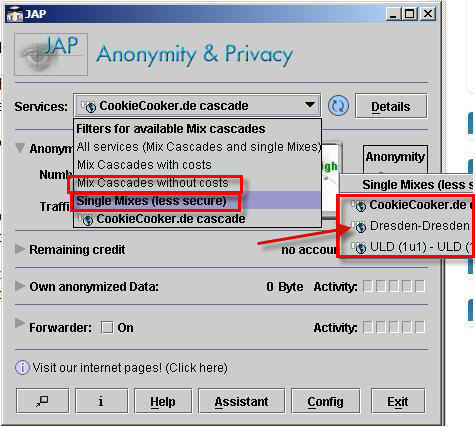
5. On the JAP Interface Click on the Services Drop Box.(As shown in the image below).

Note: This software allows to you to use Mix Cascades both ways by paying money and for free also so Don’t select cascades with cost as they will ask for money.
jap.JPG

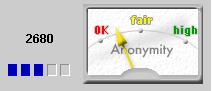
So Select any of the network in the Mix cascades without costs or Single Mixes and check the connectivity status(As shown Below the anonymity meter should be above ok or above it and if it is not try other network from the list).
anonmeter.JPG

6. Thats it. Done!

Now Open the Browser(IE Or FireFox) which you have configured previously and access orkut by simply entering the url www.orkut.com and it will be accessible with complete functionality .

Please Note:

If you face any issues or problems in following the procedure or configuring the browsers or software to access the blocked sites leave a comment here I will answer your query asap.”


Get free updates and new tricks delivered to your mailbox.

Enter your email address below:

46 Responses to “How to access blocked or restricted orkut or any site with proxy but without using any proxy servers for free.”

  1. Technix Update - Vista Tips & Tricks,Orkut Tips & Tricks,Hacking Tricks,Internet Tips on September 2nd, 2007 | 2:34 am

    […] How to access blocked or restricted orkut or any site with proxy but without using any proxy servers… admin orkut hacks, orkut tips & tricks, orkut new, internet hacks & tips, orkut proxy, orkut proxy hacks, new orkut proxy, proxy tricks, proxy hacks jap anonymity, kproxy, orkut, proxies, proxy servers, webproxy Read on […]

  2. Ajay on September 4th, 2007 | 8:33 am

    a word about web proxies…

    the 2 you have provided .. both have the keyword proxy in the domain..its blocked in most places..pls give me some others. or update tht list pls….

  3. Loius Philup on September 6th, 2007 | 4:19 am

    Hey Ajay

    Why dont you use http://www.pagemod.com

    Tell me if it work in ur place.
    I use it regularly and its the only proxy which was able to bypasss our $10k office filter.

  4. Denil Shah on September 6th, 2007 | 9:28 pm

    @ Loius , hey budy the pagemod is also not work only main page gets open and then after it shows page can not be displayd….. can you pls help if you have any alternate….

  5. HASSAN on September 7th, 2007 | 4:15 am

    NOT ABLE DOWLOAD JAP SOFTWARE ,

  6. Loius Philup on September 7th, 2007 | 8:56 am

    @Denil

    Iam no expert in web proxies..i just got the site i usually open it.. click on orkut pic and browse..

    at what instance you get the page not found.
    Since u got the first page naturally the rest should work.

    there is also a heuristics checking in it..
    u saw tht text in orange box try clickng on it..and u can contact teir support at report@pagemod.com..thts all the te info i have

  7. Vysakh on September 10th, 2007 | 4:45 am

    Heard pagemod.com got blocled in UAE

    Heres there another link

    http://pmoder.info

  8. Nirmal on September 12th, 2007 | 9:37 am

    There could be a problem with firewall. Some systems there may not be admin access and Firewall could be blocked, so changing it is difficult.

  9. Nike on September 18th, 2007 | 1:42 am

    Hi, the above mentioned website too is not working to access orkut … are there any other proxies or sites to access orkut ..

    Thanks …

  10. Tips & Tricks! | My Brain Dumper! on September 19th, 2007 | 10:46 am

    […] How to Access Blocked or Restricted Orkut by Abhishek […]

  11. Blogging with Cents » Did You Tip? on September 19th, 2007 | 12:07 pm

    […] How to Access Blocked or Restricted Orkut by Abhishek […]

  12. A Piece of the Action | Nathan Rice on September 19th, 2007 | 3:13 pm

    […] How to Access Blocked or Restricted Orkut by Abhishek […]

  13. Random Advice on Random Topics on September 19th, 2007 | 3:38 pm

    […] How to Access Blocked or Restricted Orkut by Abhishek […]

  14. Contest Blogger’s picks in the Daily Blog Tips writing project | Blog Contests: Contest Blogger on September 19th, 2007 | 7:28 pm

    […] How to Access Blocked or Restricted Orkut by Abhishek […]

  15. Advice Network Founders Blog» Blog archives » Tips Galore on September 19th, 2007 | 7:49 pm

    […] How to Access Blocked or Restricted Orkut by Abhishek […]

  16. Vishvajit on September 19th, 2007 | 10:56 pm

    hello frnd,
    can u plz tel me dat wen i open orktu through this site then y i m not being able 2 send scraps.

  17. Who Do You Think Should Win? » Pat B. Doyle on September 20th, 2007 | 4:15 am

    […] How to Access Blocked or Restricted Orkut by Abhishek […]

  18. Tips and Tricks Writing Project | Here's looking at . . . me! on September 20th, 2007 | 6:53 am

    […] How to Access Blocked or Restricted Orkut by Abhishek […]

  19. Ajay on September 20th, 2007 | 8:58 am

    Hello

    pls try https://www.pagemod.com and http://www.pagemod.com:1234

    and try in firefox tht scrap sending prob comes in IE only bcoz of the new orkut design.u can download firefox from our homepage

  20. Personal Growth with Corinne Edwards » BIG BLOG CONTEST - And I am a finalist! on September 20th, 2007 | 12:24 pm

    […] How to Access Blocked or Restricted Orkut by Abhishek […]

  21. Nazir on September 20th, 2007 | 4:36 pm

    Thanks.

  22. Blog Writing Project: Tips & Tricks Final List on September 21st, 2007 | 2:34 am

    […] How to Access Blocked or Restricted Orkut by Abhishek […]

  23. 122 tips and tricks : Foster Genuine Culture on September 21st, 2007 | 8:29 am

    […] How to Access Blocked or Restricted Orkut by Abhishek […]

  24. DailyBlogTips Blog Project : My top 10 on September 23rd, 2007 | 12:35 pm

    […] How to Access Blocked or Restricted Orkut by Abhishek […]

  25. » Social Viral Marketing Tips And Tricks J-NE.WS: The “Social Viral Marketing” Weblog: Using Social Media to drive Viral Marketing on September 24th, 2007 | 9:16 pm

    […] How to Access Blocked or Restricted Orkut by Abhishek […]

  26. ‘Tips & Tricks’ Tasters | Cyres Matters on October 4th, 2007 | 12:29 pm

    […] How to Access Blocked or Restricted Orkut by Abhishek […]

  27. ‘Tips & Tricks’ Tasters | Cyres Matters on October 4th, 2007 | 12:29 pm

    […] How to Access Blocked or Restricted Orkut by Abhishek […]

  28. Top 5 Picks from Blog Writing Project: Tips and Tricks | Shivaranjan.com on October 13th, 2007 | 9:59 am

    […] How to Access Blocked or Restricted Orkut by Abhishek (Very useful) […]

  29. Thilak on October 14th, 2007 | 12:35 am

    Yeah, like Nirmal said it could be difficult to unblock in some places like schools and offices, where you can can’t play with Firewall

  30. suhail on October 14th, 2007 | 12:23 pm

    its not workin 4 me? evn cant dwnload jap…

  31. larith on October 15th, 2007 | 9:04 am

    hai….JAP is really gr888…..thnx a lot for the information…
    i face sum pblm with JAP.
    its rarely getting connected.
    and once its connected it work for hours widout any issues.its taking many hours to get connected.
    since its working i thnk there is nothing wrong with the settings and all.
    but sumtymes its not getting connected at all even if after waiting for hours
    kindly reply me

  32. Mount Laurel on October 20th, 2007 | 10:44 pm

    i just found this proxy site: http://stayfree.uni.cc it work on my work station… unlocking friendster and myspace…

  33. Ajay on November 12th, 2007 | 11:13 am

    PAGEmod new domain : http://www.qmoder.info

  34. Welcome 2008 and 2007 round up - Technix Update- General Tips and Tricks, Vista Tips, Orkut Tricks, Hacking Tutorials, Windows Hacks, Firefox Tips on January 2nd, 2008 | 1:14 am

    […] How to access blocked or restricted orkut or any site with proxy but without using any proxy servers… […]

  35. Rajesh on January 16th, 2008 | 2:13 am

    Please provide me new and latest proxies on above mentioned email id to use gmail, yahoo,rediff and orkut.

    Proxy should be like no one can block it(easily).

    Provide me new proxies after eveery few days so that i can use them and tell them to my friends also…..

    (For your advertisement too)

  36. By pass download limit restrictions and access any blocked site with ultrasurf - Technix Update- General Tips and Tricks, Vista Tips, Orkut Tricks, Hacking Tutorials, Windows Hacks, Firefox Tips on January 22nd, 2008 | 9:51 am

    […] I had written about JAP which is again a good tunnelling software to access blocked site but has some connectivity issues […]

  37. usman on February 27th, 2008 | 4:49 am

    hi i want to open orkut on my university bt we dun have rights to install sumthin….n we cant make changes to firewalls….so how do i open orkut…??

  38. Sidra on March 1st, 2008 | 8:35 am

    If you cannot access orkut in your country, i have a software with 100you can get it through,
    if you want it then email me at
    sidratan@hotmail.com

    best regards
    Sidra

  39. Sinderel on March 6th, 2008 | 5:32 pm

    I can’t access sites with a proxy. But also I’ve done it with VPN protocol. OpenVPN which I use is suitable for mobile devices and giving an encrypted channel. It works better than proxy with it lags. VPN has stable connection and teams support.

  40. Heather on March 13th, 2008 | 2:46 pm

    None of these sites will work at my school.
    If you have a good one let me know.

  41. ather on March 19th, 2008 | 2:55 am

    well i m able to access orkut using proxy server all suggested by u all people,but not able to post scrap or update any thing please help

  42. Ali on March 21st, 2008 | 9:05 am

    Anyone has ‘Open proxies’ for UAE which are working??

  43. Karan on March 30th, 2008 | 8:40 pm

    hi
    i am maximum try to open to orkut, but every time orkut is not open, buz our co. restricted the sites, pls can u help me to open to orkut if restricted the all sites

  44. geetika on June 19th, 2008 | 10:56 pm

    hi…m not able to access orkut or facebook from my office. pl help.even JAP download not happening, as its not connecting to even that site…

    rgds,

  45. abenzio on June 24th, 2008 | 4:42 am

    here is a simple thing to ur query, use proxy visit the site and u will get list of proxy server.

Leave a Reply

XHTML: You can use these tags: <a href="" title=""> <abbr title=""> <acronym title=""> <b> <blockquote cite=""> <code> <em> <i> <strike> <strong>