If you are web surfer or a web worker you may tend to open so many tabs in firefox as per the nature and requirement of your surfing habits. In the end the more the number of tabs you open in firefox makes the problem more worse for you as it makes firefox crashing problem with these large number of tabs opened.
Cluster Tabs is a cool firefox addon which comes to rescue in such a type situations and it makes firefox more faster and fix the crashing issue due to large number of tabs – it allows you to cluster tab web addresses with others.
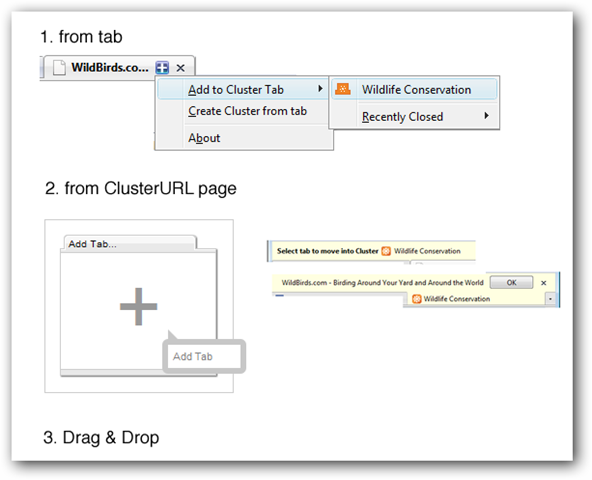
You just need to follow the procedure as described in the image above to add more than one web addresses to a single tab to create a cluster of websites under a single tab entry.
Every cluster tab you create or edit has a pubic & anonymous Cluster URL (clusterurl.com) automatically published on the web. You can anytime share these cluster tabs with your friends and others
Some Other Key Features Of Cluster Tabs are
1. Share your cluster tabs on web
2. No registration required & public & anonymous so you just install it and you are ready to go.
3. Your browsing history remains private.