Yes, you can easily transfer songs and videos directly from your pc (personal computer) to your ipod without using iTunes .But you should know why you have to use iTunes in order to transfer songs and videos from your computer to ipod.
Category: tips & tricks
There are lot of hidden features in case of windows vista which sometimes really increases the productivity of the user using it.So we can say that there are something very good that comes with vista.
Are you bored of seeing the same green progress bar again and again…and if you want the boot screen of vista to look some what different than the regular green progress bar then this post is for you.
You can simple make vista boot screen same a like linux boot screen in which you will get to see each and every starting up and loading at the time of booting and in oder to do it you have to follow the step by step procedure listed below.
When it comes to shutdown of windows vista it takes even more time as compared to windows xp. Default shutdown time of vista is about 20 seconds to kill all the services and user programs that are currently running.
But don’t worry as you can simply decrease the time required by windows vista to shutdown irrespective of any edition of vista you are using , by a simple registry trick you can decrease the shutdown time to a great extent.
There are so many times we do not want Windows Xp to update automatically but the main problem is not even solved in system with Service Pack 2 integrated due to which even when after turning automatic updates…it continuously shows the annoying pop up message says “ Your automatic updates are of please turn them on.
This message is shown by a red shield symbol which is the default icon in the taskbar for security center of Windows Xp which has the responsibility of automatic updates , antivirus monitoring and firewall of the system.
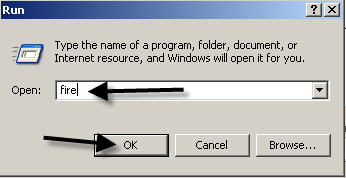
Today i am going to share a cool windows trick with all the readers of Technix Update about how can you run your favorite programs directly typing it from run prompt.
With Tweak Network Settings you can tweak these settings for faster page loading and more simultaneous downloads.Speed Up Your Browsing speed in firefox with Tweak Network Extension for firefox. This extension allows you to access under the hood network settings.
There are lots of grease monkey scripts available for doing various things like adding a customized signature , fetching the the fast and last reply of a community topic with in one click and so on…
So today i am going to list some of very usefull scripts being used in orkut by a large number of orkut freaks now a days.